Onboarding & Installation Workflow
Minimum setup to start receiving data
- Haltian: Creates your organization, imports the ordered devices, and provides a Manager account.
- You: Sign in as Manager and set up Stream API access. Use UUIDs to identify devices; map UUIDs to TUIDs only if your integration requires a TUID and one is available.
- Devices: Must be installed, connected, and reporting measurements for data to appear in your stream.
The Haltian Studio and Haltian Field workflows below are optional if you manage those tasks in your own systems.
%%{init: {'theme': 'base', 'themeVariables': {'primaryColor': '#F6FAFA', 'primaryTextColor': '#143633', 'primaryBorderColor': '#143633', 'lineColor': '#143633', 'secondaryColor': '#C7FDE6', 'tertiaryColor': '#73F9C1', 'clusterBkg': '#ffffff', 'clusterBorder': '#143633', 'edgeLabelBackground': '#ffffff'}}}%%
flowchart LR
   A([1. Order<br/>Required]) --> B([2. Connect to data<br/>Required])
   B -.-> C([3. Organize your setup<br/>Optional: Haltian apps])
    B -.-> D([4. Manage devices<br/>Optional: Haltian apps])

    style A fill:#C7FDE6,stroke:#143633,stroke-width:2px,color:#143633
    style B fill:#C7FDE6,stroke:#143633,stroke-width:2px,color:#143633
    style C fill:#F6FAFA,stroke:#143633,stroke-width:2px,color:#143633
    style D fill:#F6FAFA,stroke:#143633,stroke-width:2px,color:#143633
1. Order and provisioning — required
After you place an order, Haltian creates your organization, imports the ordered devices, and provides the first Manager account.
2. Connect to data — required
- Sign in using the Manager account.
- Set up Stream API access for your chosen transport, MQTT or Kafka. See the Stream API documentation for setup details.
Each Stream API event identifies a device by its UUID. Use the UUID as the required identifier in your integration. A TUID identifies a physical Haltian device, but may be absent for third-party devices and Device Groups. Map a UUID to a TUID only when an integration requires it and a TUID is available. You can look up both identifiers using a Service API query or in Haltian Studio or Haltian Field. If you use customer IDs, map those separately. Store UUID-to-TUID mappings in your system only when your integration needs them.
The Stream API provides live events as devices report. Physical installation and connectivity are still required for devices to send data.
Other ways to access data
Everything recorded during installation is available through the Service API, including photos. The Data API export includes all of it except photos.
Haltian IoT can also connect to third-party systems. See Integrations for available integrations.
For all the ways to get data out, see Haltian IoT in 10 Minutes.
3. Organize your setup — optional in Haltian apps
Skip these optional steps if your own systems already manage users, spaces, or device categories.
Users and spaces
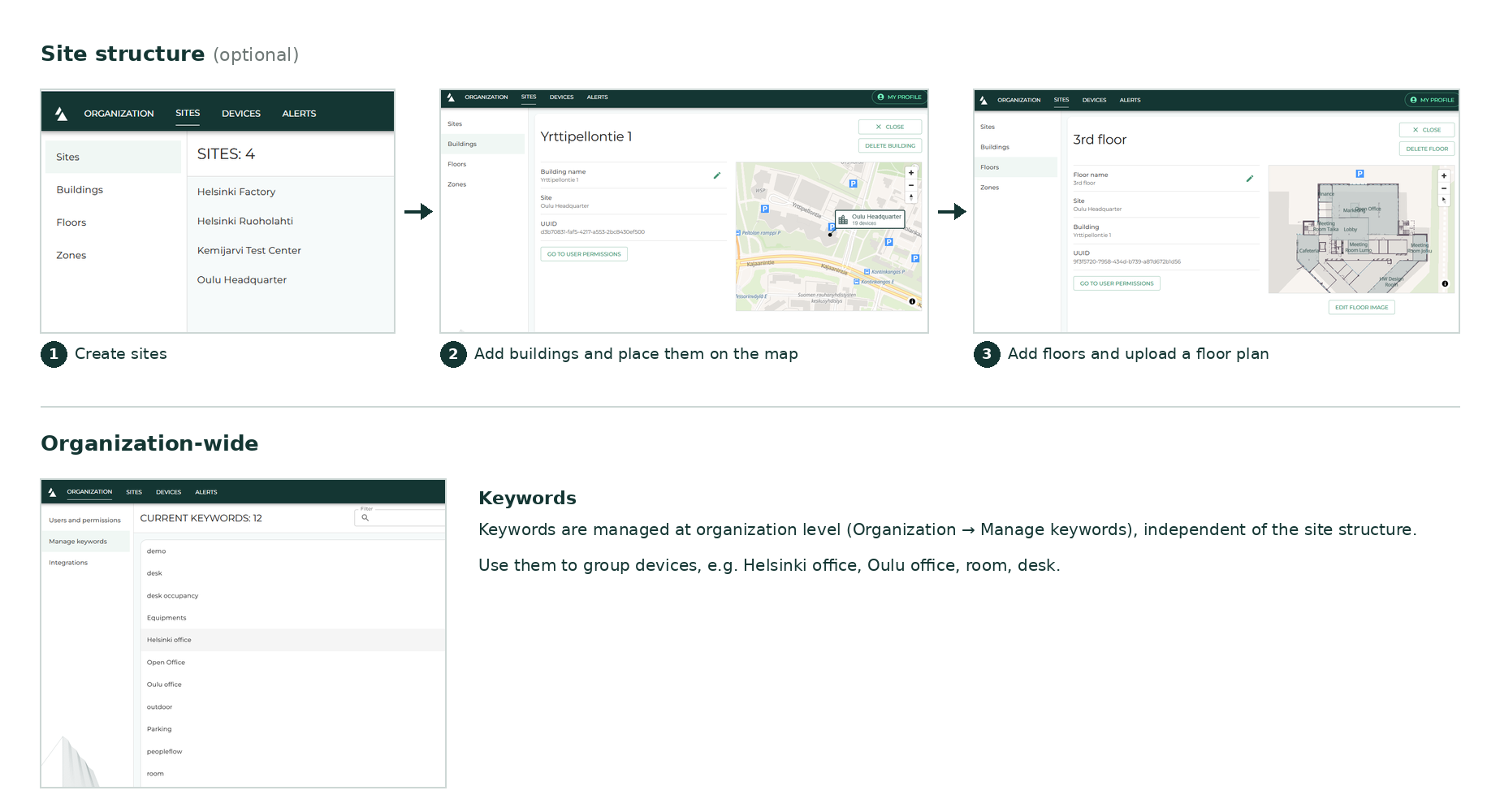
In Haltian Studio, a Manager can add users and assign roles. You can also build sites, buildings, and floors to link devices and data queries to real spaces and place devices on floor plans.
Keywords
Agree on organization-wide keywords to categorize devices and make similar devices easier to find and filter. Keywords are tags for organizing devices; they are separate from Device Groups.
Occupancy by room or area
If you need occupancy information for a room or area, create a Device Group for that space in Haltian Field or Haltian Studio. Haltian IoT uses the relevant sensors in the group to calculate occupancy for that space. See Device Groups and Plan Occupancy for Large Spaces.
For role permissions, see Roles & Access.
4. Install devices — physical installation required; app workflow optional
You must physically install devices for them to connect and report data. If you use your own systems to manage installation and device metadata, you can skip the Haltian app workflow below.
- Install and power on the gateway first; it provides the cloud connection.
- Place devices no more than 20 m apart so the mesh network can form.
If you manage installation in Haltian Field, scan each device’s QR code, place it on the floor plan if you have one, and add any metadata your team needs:
| Metadata | Purpose |
|---|---|
| Keywords | Categorize and find similar devices |
| Friendly name | Recognize the device |
| Customer ID | Link the device to your own system |
| Notes | Describe the device or location, e.g. Capacity: 6 persons |
| Photos | Document the installation spot and the space |
In Haltian Field, finish with a Health Check to check connectivity, battery, and location.
If you use Device Groups for occupancy, add only the sensors relevant to that room or area to its group. Other devices do not need to be in a group.
Using tags and locators for asset tracking? See HITS Installation Planning.
More: Haltian Field · Devices