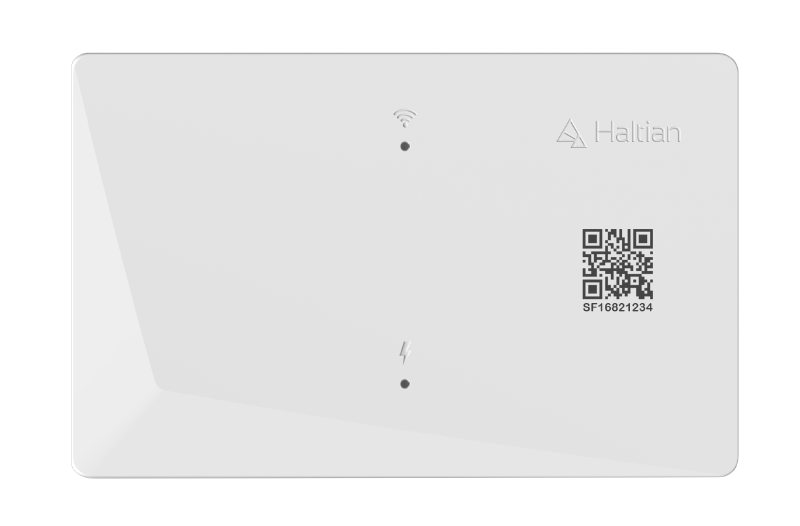
Light-powered IoT anchor device for Wirepas mesh networks. Operates as router or beacon for reliable asset tracking and positioning with energy harvesting capabilities.
The Haltian EH Locator is a versatile fixed network element designed for the Haltian Inventory Tracking Solution (HITS). This innovative device can harvest power from indoor lighting or sunlight, eliminating the need for constant external power and enabling flexible installation anywhere indoors.
The EH Locator serves as a critical component in Wirepas mesh networks, providing:
Energy harvesting: Powered by indoor light, sunlight, or USB-C
Extended battery life: Up to 10 days in router mode, 4 years in beacon mode
Reliable communication: Receives and transmits messages from asset tags and other routers
Positioning support: Transmits beacon messages for tag inventorying and positioning
Product Name
The EH Locator is sometimes referred to as “Solifer” in internal documentation and firmware files.
Key Features
Energy Harvesting
Solar panel: Integrated photovoltaic panel for indoor light and sunlight harvesting
USB-C powered: 5V USB-C input for continuous power (supports PoE-USB-C adapters)
Internal battery: 1,850 mAh Li-ion battery for backup power during outages
Power management: Intelligent system minimizes consumption for minimal maintenance
Dual Operating Modes
Router Mode
In router mode, the EH Locator:
Receives and transmits messages from asset tags and other routers
Transmits beacon messages every second (configurable) for positioning
Requires USB-C or sufficient light harvesting for continuous operation
Can operate up to 10 days on battery alone during power cuts
Status LED: Green (network)
Beacon Mode
In beacon mode, the EH Locator:
Does not route tag messages to other devices
Transmits beacon messages for tag positioning accuracy
Operates on minimal power consumption
Can operate up to 4 years on battery alone
Status LED: Blue (network)
Installation Flexibility
Multiple mounting options: indoor light mount, cable shelf mount, or wall mount
Sticky tape or zip tie mounting included
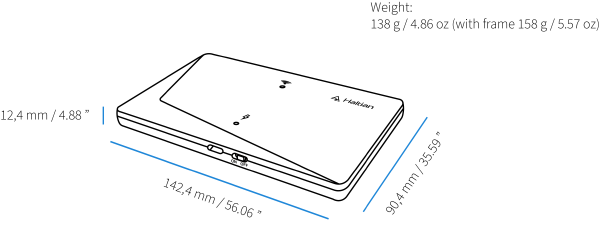
Compact form factor: 142.4 mm × 90.4 mm × 12.4 mm
Lightweight: 138g (158g with mounting bracket)
Technical Specifications
Physical Characteristics
Specification
Value
Dimensions
142.4 mm × 90.4 mm × 12.4 mm (5.6" × 3.6" × 0.5")
Weight
138g / 4.86 oz (158g / 5.57 oz with bracket)
IP Rating
IP40 (indoor use only)
Haltian EH Locator dimensions and measurements
Electrical
Specification
Value
Battery
Li-ion 1,850 mAh
Power Input
USB-C 5V (or PoE-USB-C adapter)
Energy Harvesting
Solar panel (indoor/outdoor light)
Max TX Power
+4 dBm
Environmental
Specification
Value
Operating Temperature
0°C to +50°C (recommended)
Storage Temperature
0°C to +50°C
Operating Humidity
15% - 85% RH (non-condensing)
Storage Humidity
15% - 85% RH (non-condensing)
Network
Specification
Value
Wireless Protocol
Wirepas Mesh 5.2+
Device Model
com.haltian.device.tsrb01
Operating Modes
Router / Beacon (configurable via Haltian IoT Studio)
Beacon Interval
1 second (configurable)
Battery Life
Operating Mode
Battery Life (no external power)
Router Mode
Up to 10 days (fully charged battery)
Beacon Mode
Up to 4 years (fully charged battery)
Device Identification
Each Haltian EH Locator has:
QR Code: Located on the device for quick identification
Device Model: com.haltian.device.tsrb01
TUID: Unique device identifier
Power Management
Indoor Light Brightness Requirements
The EH Locator’s energy harvesting efficiency depends on indoor light brightness. For router mode operation without USB-C power, minimum light exposure hours per week are required:
Lux Level
Router: Min On-Time per Week
40,000 lux
35 hours
35,000 lux
45 hours
30,000 lux
50 hours
25,000 lux
65 hours
20,000 lux
85 hours
15,000 lux
168 hours (always on)
10,000 lux
Use USB-C power
Light Measurement
Measure lux levels at the height where the EH Locator will be installed to ensure adequate power harvesting.
For beacon mode, the device can operate up to 4 years on a fully charged battery, and even at low indoor light brightness (10,000 lux), the energy harvesting system can recharge the battery.
LED Status Indicators
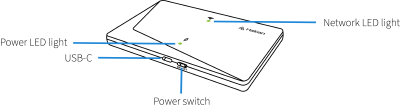
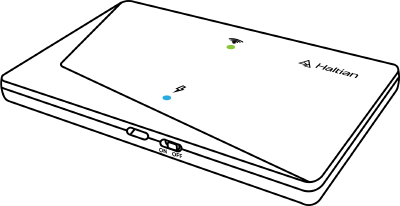
The EH Locator features two LEDs for status indication:
Router mode: Both Power LED and Network LED are green
Beacon mode: Power LED is green, Network LED is blue
Power LED (Green)
Off: No power / device switched off
Constant Green: USB-C power connected OR solar harvesting producing sufficient power
Network LED (Red/Green/Blue)
Blinking Green: Establishing mesh network or device just powered on
Constant Green: Mesh network established, operating in Router mode
Constant Blue: Operating in Beacon mode
Blinking Red: Error (network error, low battery, or undefined error)
LED Auto-Off
When operating correctly (state 6 or 7), the LEDs are only lit for the first 10 minutes after installation, then turn off to conserve power.
Typical Use Cases
Inventory Tracking
Deploy multiple EH Locators to create a mesh network covering warehouse or facility
Tags report to nearest locators
Locators forward messages to gateway and cloud platform
Real-time asset location tracking and inventory management
Indoor Positioning
Install EH Locators at regular intervals (recommended spacing: consult glossary for “Locator Spacing”)
Beacons provide RSSI-based positioning reference points
Tags calculate position based on signals from multiple locators
Accurate indoor asset positioning and zone detection
Mesh Network Extension
Add EH Locators to extend Wirepas mesh network coverage
Fill coverage gaps in challenging RF environments
Ensure reliable connectivity between tags and gateways
Configuration
EH Locators are configured and managed through Haltian IoT Studio:
Operating Mode: Switch between Router and Beacon modes
Beacon Interval: Adjust transmission frequency
Status Monitoring: View battery level, power source, network status
Firmware Updates: Remote firmware updates via cloud platform
Complete installation guide for Haltian EH Locator including indoor light mounting, cable shelf installation, wall mounting, power requirements, and LED diagnostics