Operation
How 3-PIR Detection Works
Patented Triple Passive Infrared Technology
The Haltian ENTRYWAY uses three Passive Infrared (PIR) sensors in a patented configuration to detect people moving through doorways.
Detection principle:
- Three PIR beams: Sensor has three parallel PIR detection zones across passageway
- Heat detection: PIR sensors detect infrared radiation (heat) emitted by human bodies
- Sequential triggering: Person walking through triggers beams sequentially (Beam 1 → Beam 2 → Beam 3)
- Direction determination: Order of beam triggering determines direction (entry vs. exit)
- Count increment: Entry or exit counter increments
PIR Beam Configuration
- Three parallel beams: Spaced to cover passageway width (up to 1600mm)
- Horizontal detection zones: Beams oriented across passageway (perpendicular to traffic flow)
- Thermal sensitivity: Detects difference between body heat (~36-37°C) and ambient temperature
Complete passage requirement:
- Person must walk through all three beams completely for accurate count
- Partial passage (e.g., person stops midway) may not register or may cause errors
- Sequential beam triggering (Beam 1 → 2 → 3 or 3 → 2 → 1) determines direction
Directional Counting Logic
Entry vs. Exit Determination
The sensor determines direction based on the order in which PIR beams are triggered:
Entry direction (example configuration):
- Person triggers: Beam 1 → Beam 2 → Beam 3 (towards sensor)
- Result: “entries” counter increments by 1
Exit direction:
- Person triggers: Beam 3 → Beam 2 → Beam 1 (away from sensor)
- Result: “exits” counter increments by 1
Default Direction Configuration
Default (logo on left):
- Entry: Towards sensor (person walks towards device face)
- Exit: Away from sensor (person walks away from device face)
Custom configuration:
- Contact Haltian support to configure non-default entry direction
- Useful for vertical installations or specific traffic flow requirements
Counting Accuracy
Accurate counting requires:
- Person walks through complete passage (all three beams)
- One person at a time (simultaneous passage causes errors)
- Sufficient temperature difference (body heat vs. ambient)
- No lingering in detection zone (person must exit fully)
Measurement and Reporting Intervals
Detection and Reporting Behavior
First detection:
- Immediate report: First entry or exit after idle period reported immediately
- Latency: Typically within 1-5 minutes (Wirepas mesh network transmission time)
Active period (after first detection):
- Measurement interval: Default 30 seconds
- Sensor reports entry/exit counts every 30 seconds while activity continues
- Counts accumulated over 30-second window
Idle period (no movement):
- Reporting interval: Default 1 hour
- If no entries/exits for 1 hour, sensor sends “zero activity” report
- Confirms sensor operational even when no traffic
Reporting Timeline Example
00:00 - Idle (no movement for past hour) → Report: entries=0, exits=0
00:15 - Person enters → Immediate report: entries=1, exits=0
00:16 - Person exits → Wait for 30s interval
00:16:30 - 30s interval → Report: entries=0, exits=1 (since last report at 00:15)
00:17 - Person enters → Wait for 30s interval
00:17:30 - 30s interval → Report: entries=1, exits=0 (since last report at 00:16:30)
01:17:30 - No movement for 1 hour → Report: entries=0, exits=0 (idle report)
Configurable Intervals
Via Haltian IoT (contact support):
- Measurement interval: Default 30s, configurable (e.g., 10s, 60s)
- Reporting interval (idle): Default 1 hour, configurable (10s to 24 hours)
Trade-offs:
- Shorter intervals = More real-time data, but faster battery drain
- Longer intervals = Extended battery life, but delayed data
Data Transmission
Measurement Values
The sensor transmits entry and exit counts since last report. The example below shows the Haltian IoT JSON format as delivered by the Haltian IoT API. For the raw Wirepas CBOR on-wire format (different field names and structure), see Uplink Messages.
Typical Haltian IoT API payload:
{
  "measurementDirectionalMovement": [
    {
      "deviceId": "df1b0c93-60a2-4cc9-8646-762fc1d2d42e",
      "entries": 3,
      "exits": 2,
      "measuredAt": "2025-01-14T10:30:00.714+00:00"
    }
  ]
}
Field descriptions:
- deviceId: Unique sensor identifier (UUID)
- entries: Number of people who entered since last report
- exits: Number of people who exited since last report
- measuredAt: ISO 8601 timestamp (UTC) of measurement
Over-the-Air Transmission
Wirepas Massive mesh network:
- Sensor generates entry/exit count
- Transmits via Wirepas mesh to nearby sensors (routers)
- Packet hops through mesh to gateway
- Gateway forwards to Haltian IoT
- Data visible in Haltian IoT Studio
Transmission frequency:
- First detection: Immediate (within 1-5 minutes)
- Active period: Every 30 seconds (default)
- Idle period: Every 1 hour (default)
- Battery optimized: 4-year battery life with default settings
Battery Management
The ENTRYWAY uses 2× AA alkaline batteries (user-replaceable) with up to 4-year battery life under default settings. For detailed battery specifications, life estimates by configuration, and power consumption factors, see Specifications — Battery.
Replacing Batteries
When to replace:
- Battery level < 10% in IoT Studio
- Sensor not reporting (battery fully depleted)
- Scheduled replacement after ~4 years (proactive maintenance)
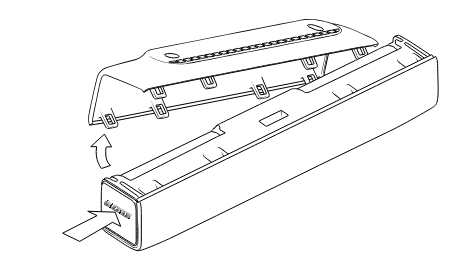
Replacement procedure:
- Access battery compartment (remove cover)
- Remove 2× old AA batteries
- Insert 2× new AA alkaline batteries (observe polarity markings)
- Replace cover
- Verify sensor resumes operation (LED indicator, IoT Studio “Last Seen”)
Post-replacement:
- Sensor automatically rejoins Wirepas mesh network
- Battery level resets to 100% in IoT Studio
- No configuration changes needed
People Counting Accuracy
Counting accuracy depends on installation quality, traffic patterns, and environmental conditions:
| Condition | Expected Accuracy |
|---|---|
| Single-file traffic, optimal conditions | > 95% |
| Moderate traffic (1-2 people/min) | > 90% |
| Busy traffic (> 5/min, some simultaneous) | 80-90% |
Key factors affecting accuracy:
- Temperature difference — PIR requires ~15-20°C contrast between body heat and ambient temperature
- Simultaneous passage — Side-by-side traffic may be undercounted
- Complete passage — Person must walk through all three PIR beams
- Passageway width — Maximum 1600mm for reliable detection
For detailed diagnosis and solutions for accuracy issues, see Troubleshooting — Counting Accuracy Issues.
Operational Modes
The sensor supports three modes balancing data timeliness and battery life. The default Standard Mode (30s measurement, 1-hour idle reporting) is optimized for ~4-year battery life.
For detailed mode descriptions, configuration options, and how to switch between modes, see Configuration — Operational Mode Presets.
Environmental Operating Conditions
ENTRYWAY is designed for indoor use only: operating temperature 0–50°C, humidity 8–90% RH (non-condensing). PIR detection accuracy is best at ambient temperatures of 15–25°C. The sensor is not IP-rated and must not be installed outdoors.
For complete environmental specifications, see Specifications — Environmental.
Operational Best Practices
- Placement and installation — See Installation for mounting methods, placement strategies, and installation checklist
- Configuration tuning — See Configuration for interval adjustments and mode presets
- Accuracy and battery optimization — See Troubleshooting — Performance Optimization
Monitor sensor health regularly in IoT Studio:
- Battery level: Alert at < 20%, replace at < 10%
- Last seen: Confirm recent communication (< 1 hour)
- Signal strength (RSSI): Ensure > -85 dBm
- Entry/exit counts: Verify patterns match expected traffic
Data Interpretation
Understanding Entry/Exit Patterns
Visitor counting:
- Total entries per day: Sum of all entry counts over 24 hours
- Total exits per day: Sum of all exit counts over 24 hours
- Net change: Entries - Exits (estimate of current occupancy change)
Utilization analytics:
- Peak times: When entry counts highest (identify busy periods)
- Low traffic: When entry counts lowest (identify unused times)
- Average duration: Entries vs. exits timing (how long people stay)
Occupancy estimation:
- Net occupancy: Cumulative (entries - exits) since baseline
- Current occupancy: Estimate based on net change (requires baseline calibration)
Integrations and Downstream Use
Common integrations:
- Occupancy dashboards: Real-time display of entry/exit counts
- Meeting room booking systems: Utilization data for scheduling
- Building management systems (BMS): Visitor analytics
- Analytics platforms: Historical trend analysis (daily/weekly/monthly)
Data export:
- API access to real-time entry/exit data
- Historical data export (CSV, JSON)
- Webhook notifications on activity
- Third-party platform integration via Haltian APIs
Operational Limitations
What ENTRYWAY Can Detect
✅ Detectable:
- People walking through passageway (heat sources ~36-37°C)
- Directional movement (entry vs. exit)
- Individual counts (one at a time, sequential passage)
❌ Not reliably detected:
- People passing simultaneously side-by-side
- Incomplete passage (person stops midway, doesn’t exit detection zone)
- Very fast movement (running, may trigger beams out of sequence)
- Stationary people (sensor detects movement through beams, not static presence)
Physical Constraints
- Maximum passageway width: 1600mm (1.6 meters)
- Maximum passageway height: 2800mm (2.8 meters)
- Indoor use only: 0-50°C, 8-90% RH
- Binary counting: Counts individuals, does not identify or track specific people
Privacy and Data
100% anonymous detection:
- No cameras or image capture
- No personal identification
- Only heat source movement detected
- GDPR-compliant (no personal data collected)
Support and Maintenance
Routine maintenance: Check battery quarterly, verify mounting annually, clean sensor window if dusty. For battery replacement steps, see Replacing Batteries. For preventive maintenance schedule, see Troubleshooting — Preventive Maintenance.
Support contact: support@haltian.com — configuration changes, analytics support, warranty questions