Devices by Model
Browse your device fleet organized by device model type
Overview
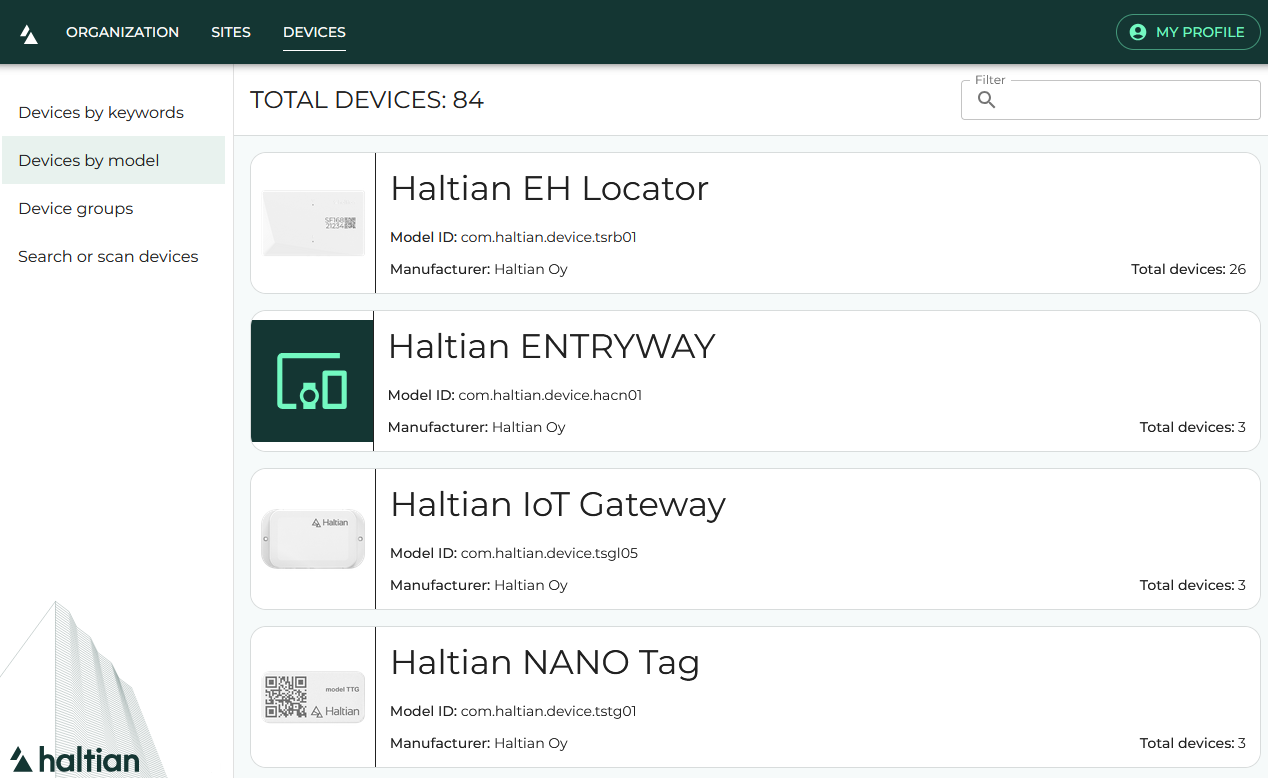
The Devices by Model view lets you browse all devices in your organization grouped by their hardware model. This is useful for getting an overview of your fleet composition or finding all devices of a specific type.
Roles
All roles can browse devices by model. Editing device details requires Installer, Designer, or Manager role.
Browsing by Model
- Click Devices in the top navigation
- Click Devices by Model in the sidebar
- You see a list of all device models in your organization with device counts
Click a model to see all devices of that type.
Device List
After selecting a model, you see a list of matching devices. Each device shows:
- Device name
- Device model
- Connection status
Click any device to open its Device Details.
Exporting to CSV
Click Export as CSV in the toolbar to download the displayed device list as a semicolon-delimited CSV file. The export includes all columns shown in the list.
Refreshing
Click the refresh button to reload the device list with the latest data from the server.
Next Steps
- Device Details — View full device information
- Device Search — Find a specific device
- Device Groups — Browse devices by logical groups