People flow
How many people come in and go out through your entrances, and when
Overview
People flow shows how many people come in and go out through your entrances, and when. It reads the entries and exits that people counters report to Haltian IoT. You see the busiest hour and day, when people arrive and when most have left, and which entrance carries the traffic. Where a counter was silent for part of the period, the app says “at least” instead of guessing.
A device is part of People flow when it carries the keyword peopleflow, people flow, entrance or entryway in Haltian Studio, plural forms included, and counts entries and exits.
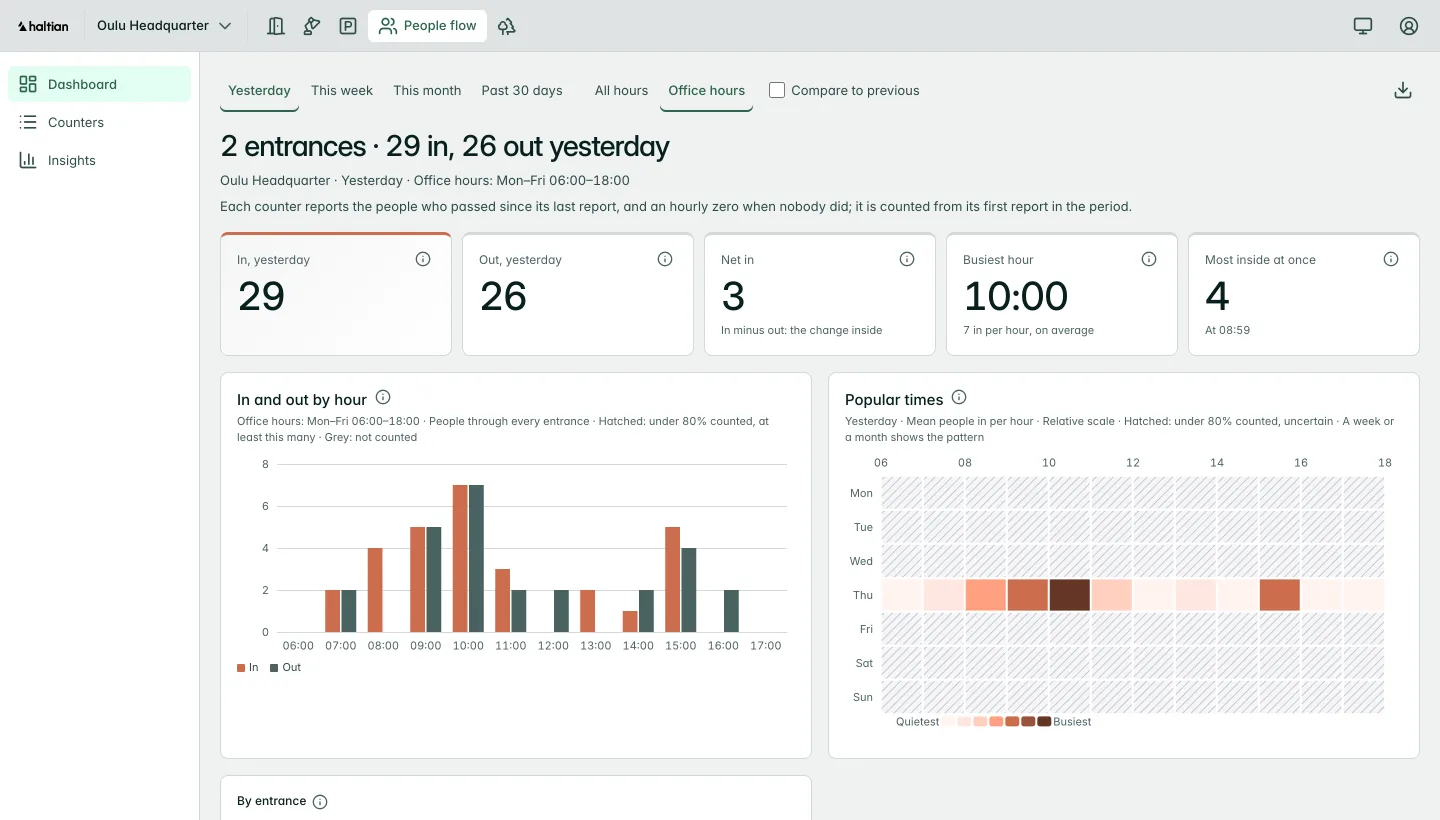
The People flow dashboard, with demo data
Who it helps
| Person | What they get |
|---|---|
| Facilities or workplace manager | People in and out per day, the entries on an average working day, the busiest day and the busiest hour |
| Site, reception or front-desk lead | When arrivals start, the peak hour of arrivals, and the hour by which most people have left |
| Property manager with several doors | The traffic at each entrance and its share of all entries |
| Whoever looks after the counters | Which counters are in the app, when each last reported, and whether its in and out agree |
Views
| View | What you see |
|---|---|
| Dashboard | The number of entrances and people in and out. Tiles for In, Out, Net in, Busiest hour and Most inside at once. In and out by hour or by day, Popular times by weekday and hour, and a By entrance table |
| Counters | Each device with its location, its Last reading before midnight, whether it is ready for People flow, and when it was last seen |
| Insights | Entries, average working day, Busiest day, Arrivals from, Busiest hour in and Most gone by. People in by day, when people arrive and leave, peak hours by weekday, and a By entrance table with Out vs in |
| Settings | Which devices count, when a device is ready, the scope, and the office hours editor |
All reports use the period bar, and Dashboard and Insights can be exported.
Key terms
- In and out — the passes counted at every entrance in the period. When an entrance was not counted for part of it, the total says “at least”.
- Most inside at once — the highest sum of the counters’ people counts at the same moment. It shows a figure only when every counter in the space had a valid people count at some moment of the period.
- Arrivals from — the first working-day hour with at least a quarter of the peak hour’s arrivals. Most gone by is the end of the last hour with at least a quarter of the peak’s exits. One early or late person does not move them.
- Out vs in — how far a counter’s exits differ from its entries. A gap of more than a few per cent means the counter misses passes in one direction.
Set up in Haltian Field and Haltian Studio
- In Haltian Field, install each device in a space: site, building and floor.
- Add the keyword
peopleflow,people flow,entranceorentrywayto the device, in Haltian Studio or Haltian Field. - Tag each entrance counter, or a device group of counters. A counter must count entries and exits.
Good to know
- Entries count passes through a door, not people. Someone who goes out for lunch and comes back is counted twice.
- The app does not estimate how many people are inside from in minus out: counters drift, and the estimate would show the drift rather than the people.
- People flow shows charts and tables; it does not place entrances on the floor plan.
Try it
- Open People flow and choose a building or floor in the space selector.
- On Dashboard, choose This week and read people in and out, and the Busiest hour.
- Turn on Compare to previous to see last week’s bars beside this week’s.
- Open Insights, choose This month, and read Arrivals from, Busiest hour in and Most gone by.
- In the By entrance table, check Out vs in for each counter, then export the report.