Parking
How full the car park was, when it fills, and how long vehicles stay
Overview
Parking shows how the car park was used. One sensor is one space. You see how full the car park was on average, how many spaces were still free at its busiest moment, when it fills, how long cars stay and which spaces are rarely used. A sensor is part of Parking when it carries the keyword parking in Haltian Studio.
Parking shows measured occupancy only: parking booking is not part of Haltian IoT.
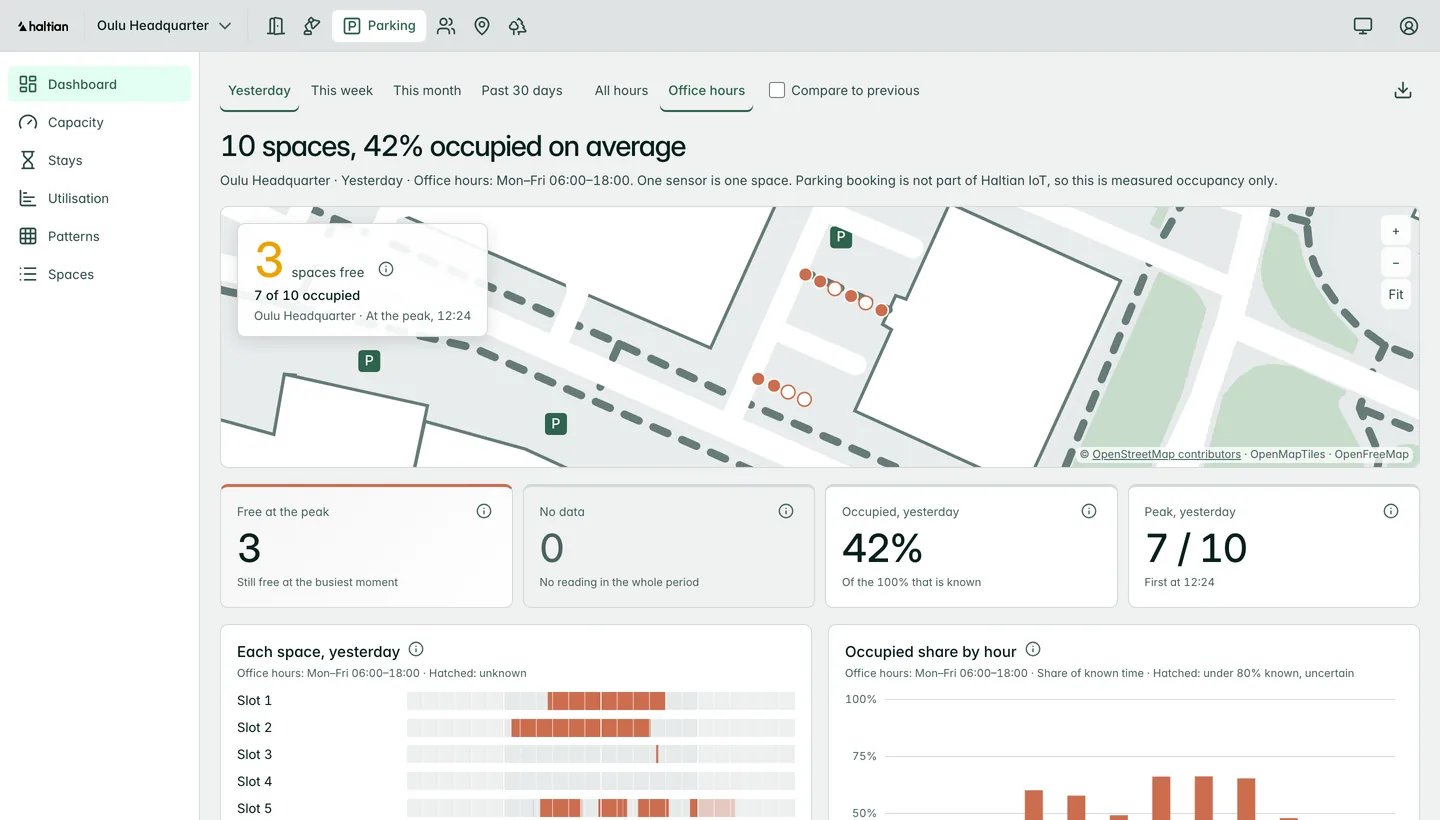
The Parking dashboard, with demo data
Who it helps
| Person | What they get |
|---|---|
| Facilities or property manager | How often the car park is effectively full or has no free space, on how many days, and from what time |
| Workplace or real-estate planner | Utilization per space, spaces never used, and the busiest and quietest hours of the week |
| Site or reception staff | How full each space was, and the spaces free at the busiest moment, on a street map of the site |
Views
| View | What you see |
|---|---|
| Dashboard | The number of spaces and their average occupied share. A street map with each sensor drawn by its occupied share: occupied at 50 % or more, unoccupied below, or no data. Tiles for Free at the peak, No data, the occupied share and the peak. A timeline strip per space, and the occupied share by hour or by day |
| Capacity | Time effectively full, time with no free space, days effectively full, the typical time it gets there, and peak occupancy by day |
| Stays | The number of stays, stays per space per day, median and average stay, and long stays of 8 h or more, with stay lengths and a table by space |
| Utilisation | Average utilization per space, the least used space, spaces never used, and a bar per space, most used first |
| Patterns | A weekday-by-hour chart of the occupied share across all spaces, with the busiest and the quietest hour |
| Spaces | Each sensor with its location, its Last reading before midnight, whether it is ready for Parking, and when it was last seen |
| Settings | Which devices count, the scope, and the office hours editor |
All reports use the period bar and can be exported.
Key terms
- Free at the peak — the spaces minus the most spaces occupied at the same moment in the period.
- Effectively full — at least 90 % of the spaces occupied, the level a car park with a sensor on each space is run at (US FHWA). Unknown spaces never count as occupied.
- No free space — every space taken: what a driver arriving at that moment finds.
- Stay — one continuous occupied period of a space. Stays cut by the start or end of the period are left out of the median and the average.
Set up in Haltian Field and Haltian Studio
- In Haltian Field, install each device in a space: site, building and floor.
- Add the keyword
parkingto the device, in Haltian Studio or Haltian Field. - Place each sensor in Haltian Field to show it at its own spot on the street map.
- Tag every space’s sensor: one sensor is one parking space.
- In Haltian Studio, give the site a location. The street map opens on it.
Good to know
- There is no vehicle identity. Two cars swapping quickly in one space can read as one stay.
- The street map needs a network connection and a location with coordinates. When no sensor has a position of its own, a single pin for the site shows the state at the busiest moment.
- Space names are the sensor names. The effectively-full level (90 %) and the long-stay limit (8 h) are fixed.
Try it
- Choose a location in the space selector and open Parking.
- On Dashboard, see how full each space was yesterday and the spaces free at the busiest moment.
- Choose This week, turn on Compare to previous, and open Capacity.
- Open Utilisation to find spaces that are rarely or never used.
- Export the figures as CSV.